sochub: An Open-Source AI-Powered Case Management Platform
A multi-tenant, AI-assisted SOC case management system built for security teams that have outgrown Jira but can't justify the enterprise SIEM-adjacent platforms.
Most security teams I’ve worked with don’t have an alert problem — they have a structure problem. They have plenty of signals coming in. What they’re missing is a coherent place to turn those signals into investigations, link the artifacts together, and keep enough context that the next analyst can pick up where the last one left off.
The patterns repeat across cloud-native startups, MSSP-style operations, crypto infrastructure teams, and compliance-heavy enterprises:
- Jira configured to pretend it’s a SOC platform, with custom fields nobody trusts
- Slack threads functioning as the source of truth for active incidents
- Expensive enterprise platforms that few people on the team fully understand
- Spreadsheets, somehow, still holding the line
Each of these works until it doesn’t. The break point usually comes during a real incident, when nobody can find the IOCs from the related case three weeks ago, or when an audit asks for a timeline that nobody can reconstruct.
sochub is what I built to solve that for myself — and then for the teams I kept seeing run into the same problem. It’s now fully open source: github.com/sochub/soc-hub.
What sochub Is
sochub is a multi-tenant, AI-assisted SOC case management platform designed around how investigations actually work, not around generic ticketing concepts retrofitted to security.
The design priorities are:
- Case lifecycle management that maps to real triage and IR workflows, not generic ticket states
- Artifacts and IOCs as first-class objects that exist independently of any single case and can be linked across investigations
- Investigation mapping for the relationships that connect cases, IOCs, and entities
- Auditability by default, not as an afterthought — every state change is captured with attribution
- Privacy-first AI assistance powered by local LLM inference, so sensitive case data never leaves the environment — and a copilot that proposes actions you confirm, never silent writes
Each of these is a deliberate choice driven by a specific failure mode I’ve watched teams run into.
Operations Dashboard
The dashboard is the operational view — what’s open, what’s critical, where the team’s time is going. It’s not just a metrics surface; it’s the answer to “what should I look at first” when you sit down at the start of a shift.
What it surfaces:
- Opened vs. resolved trends over time
- A severity × status heatmap of the active caseload
- Open-case aging, so nothing quietly rots in the queue
- Mean time to resolution (MTTR) and SLA compliance
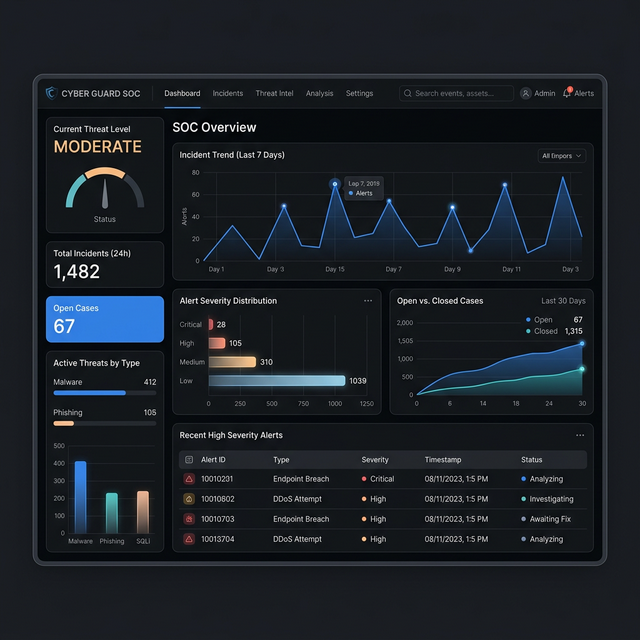
The goal isn’t a vanity dashboard. It’s operational clarity for a team that has more cases than people.
Cases as First-Class Objects
A case in sochub isn’t a generic ticket. It’s a structured incident record built around how investigations are actually conducted.
Each case supports:
- Severity classification with an audited change history
- A status lifecycle aligned to triage, investigation, containment, and closure phases
- Artifact and IOC linking — both directions, so you can pivot from a case to its evidence and from any artifact back to every case it’s appeared in
- Timestamps for every meaningful state transition, not just creation and update
- Update trails that read like a narrative of the investigation rather than a flat log
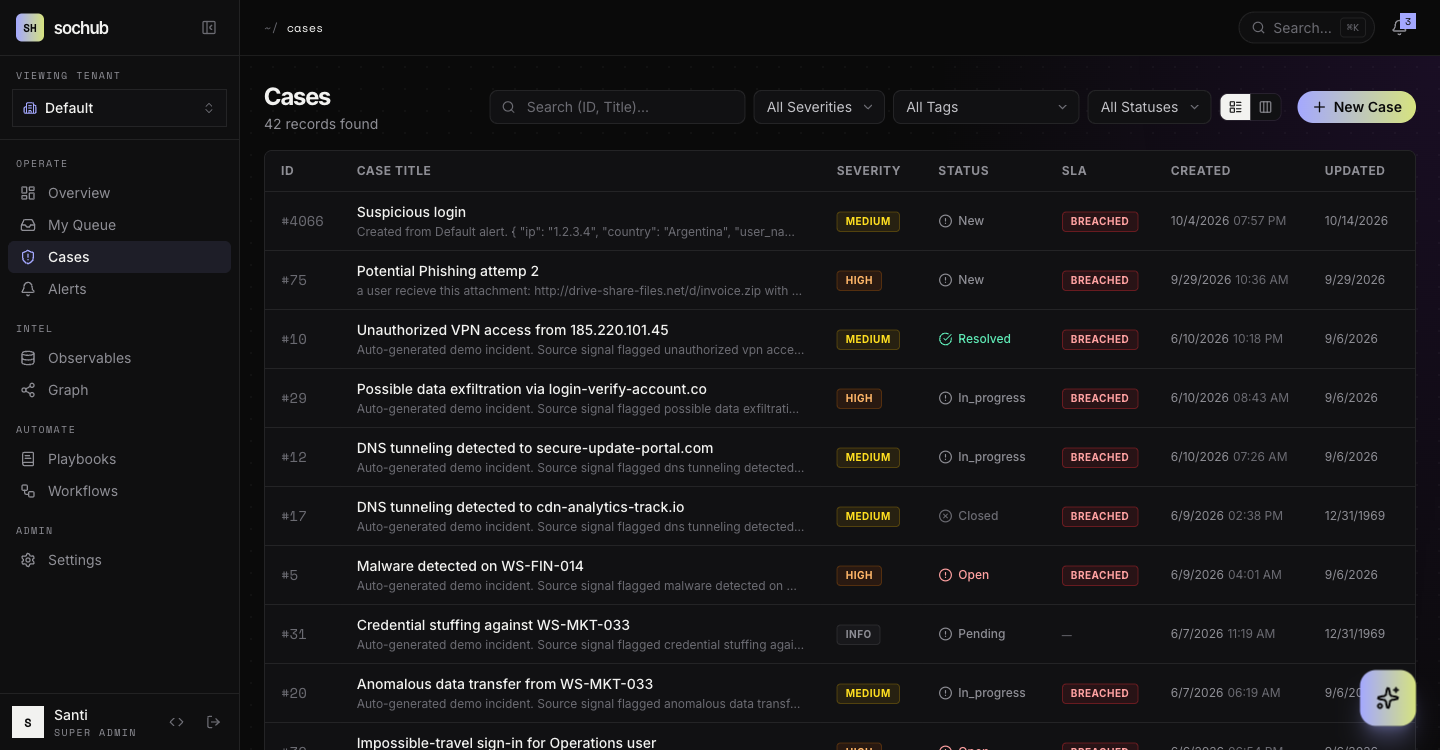
Every new case also gets an AI triage pass — a suggested severity, tags, a matching playbook, related cases, and next steps — so the first analyst to open it starts with a hypothesis instead of a blank page.
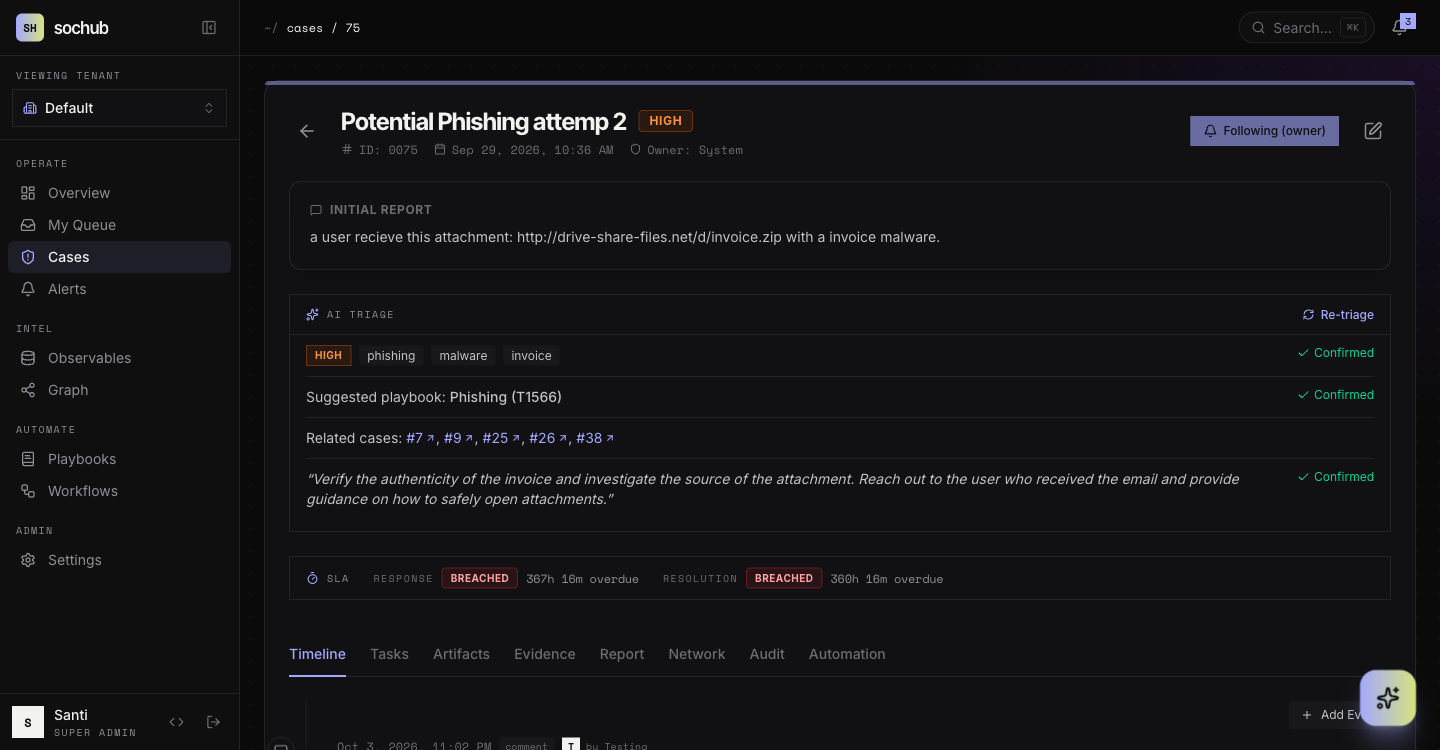
This is incident-focused tracking, not generic ticket management dressed in security language.
Artifact and IOC Repository
Investigations are about relationships. The same suspicious domain might appear in three cases over six months — and if you can’t connect them, you’ll keep treating each as an isolated event when it’s actually a campaign.
sochub provides a centralized, queryable repository for:
- Email addresses, with sender/recipient context preserved
- Domains and subdomains, with first-seen and last-seen tracking
- IP addresses, including ASN and geographic enrichment
- Files, hashes, and other evidence artifacts — malware samples are stored in a password-protected ZIP and hashed into an artifact on upload
Indicators are enriched against VirusTotal, URLhaus, ThreatFox, RDAP and crt.sh. Enrichment respects TLP, so private values never leave your network.
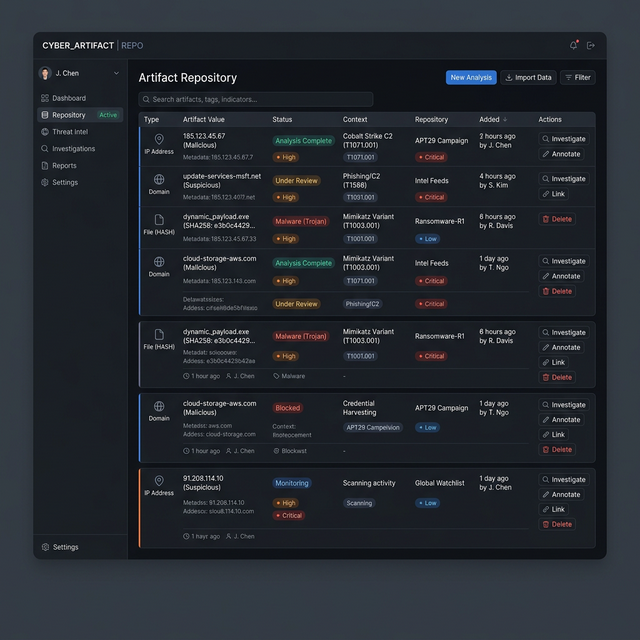
Every artifact links back to the cases it’s involved in. Nothing lives in isolation, which is the whole point — isolation is what causes teams to miss campaign-level patterns hiding in their case data.
Investigation Graph
Investigations aren’t linear. They’re graphs. The investigation graph makes that graph navigable — a force-directed map of cases, artifacts and IOCs.
It visualizes:
- How cases connect through shared artifacts, entities, or actors
- Where IOCs overlap across investigations that might otherwise look unrelated
- Campaign patterns that emerge when you can see multiple cases at once
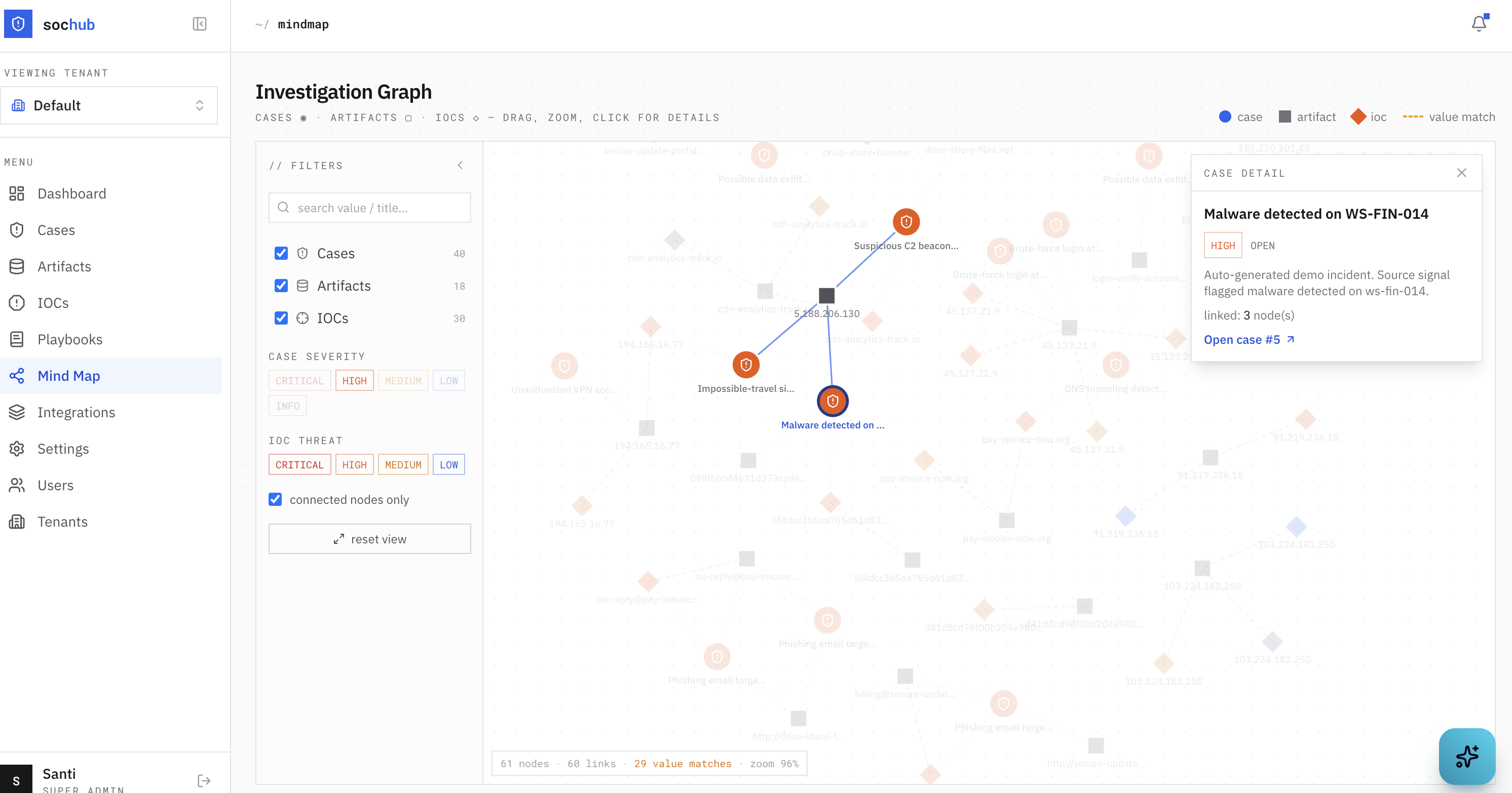
This is the layer where individual investigations turn into intelligence — where you stop responding to events and start reasoning about adversaries.
Multi-Tenant by Design
sochub was built from day one with multi-tenancy in mind, because the teams that need it most aren’t single-org SOCs:
- MSSPs running operations across many client environments
- Multi-entity organizations where business units need data isolation
- Security consultancies that need clean separation between engagements
One account can belong to many tenants, with a role per tenant and an in-app tenant switcher. Isolation is enforced per row at the data layer, and each tenant can configure its own SAML SSO and require authenticator-app MFA.
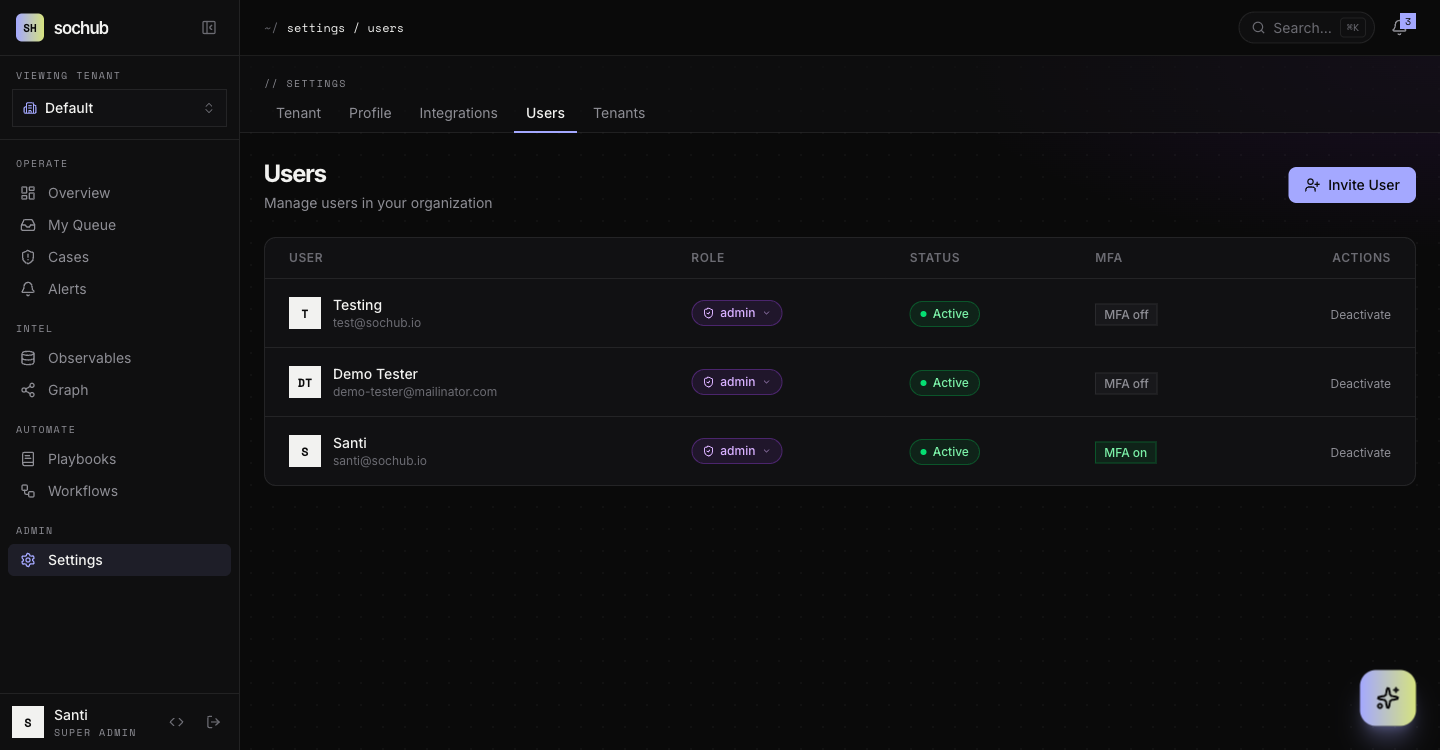
Security isn’t a feature you add later. It’s part of the data model.
Architecture (For Builders)
This isn’t a prototype dressed up for a demo. The stack is production-shaped:
Backend
- FastAPI with fully async request handling
- Async SQLAlchemy for non-blocking database access
- PostgreSQL via
asyncpgfor performance under concurrent investigation load - Celery + Redis for background work — enrichment, AI inference, scheduled jobs
Frontend
- React 19 with the modern concurrent rendering features
- TypeScript end-to-end
- TanStack Query for server-state management
- React Router v7, Tailwind CSS and Recharts
AI
- Ollama for local LLM inference by default, so case data, artifacts, and prompts never leave the environment
- A per-tenant provider setting if you’d rather bring your own model
Auth
- JWT with session revocation, Argon2 password hashing, TOTP two-factor, per-tenant SAML SSO
The system is fully containerized with Docker Compose, audit-logged at the application layer, and exposes a versioned API (/api/v1) so integrations don’t break when internals change. Getting it running locally is three commands — see the quick start.
Why Open Source
Three reasons.
Security tools should be inspectable. If you can’t read the code that’s making decisions about your incidents, you’re trusting a vendor’s marketing more than your own engineering judgment.
AI in security shouldn’t require data leakage. Every “AI-powered” SaaS security tool that needs your investigation data to function is a privacy and compliance problem waiting to surface. Local inference removes that tradeoff.
The future of security tooling is composable. No single vendor will own detection, response, and case management for every team. Open, well-documented building blocks beat closed monoliths.
Where It’s Going
sochub is in active development. Since this post first went up, several of the “next” items have shipped: AI triage on every new case, a marketplace of MITRE-mapped IR playbooks, a visual automations builder with Slack “ask a person” steps, AI-assisted incident reports with TLP-marked export, and @mentions with notifications. The story of how that round got built is in Vibecoding an Open-Source SOC Platform.
Still on the list:
- Deeper SIEM integrations to pull alerts directly into the case lifecycle
- More community-contributed playbooks for common case types
If you’re running a SOC and any of this resonates, clone it, run it in your environment, and open an issue with what works and what doesn’t. The goal is better security tooling, built in the open, that teams actually want to use.